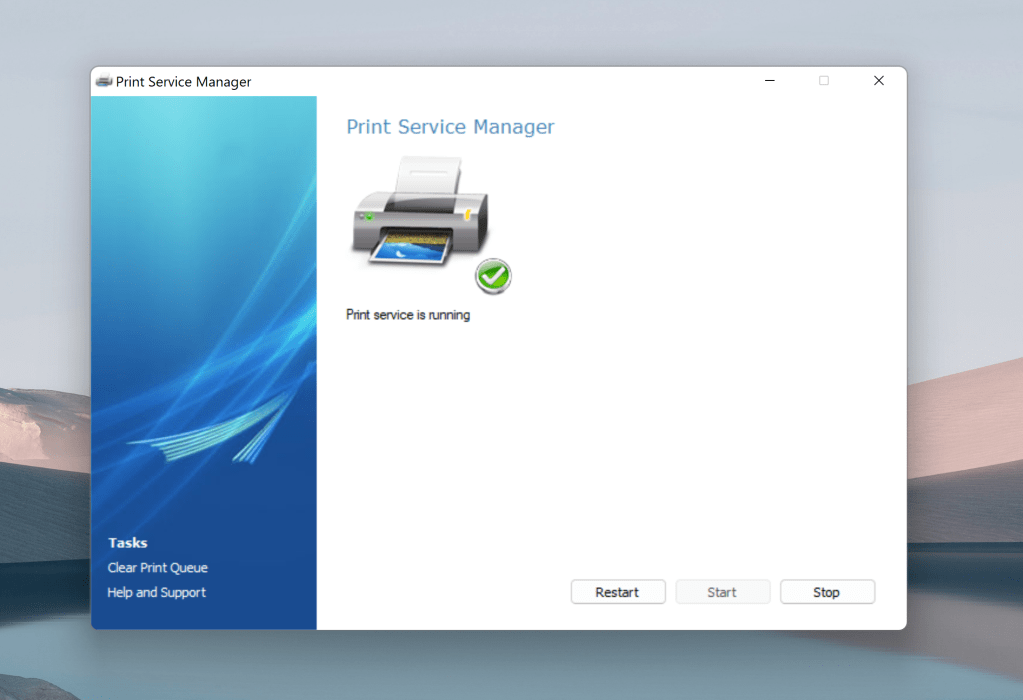
Print Service Manager
Print Service Manager is a lightweight freeware tool that allows users to manage the printing service on Windows easily. It enables users to start, stop, or restart the print service with a single click and forcibly clear the print queue in case documents are stuck.
To use Print Service Manager, download and install the software. Open the application, and you’ll see options to start, stop, or restart the print service. If you encounter stuck print jobs, use the “Clear Print Queue” option to forcibly remove them.
One-Click Service Management
Start, stop, and restart print services effortlessly without needing a system restart. Removes stuck print jobs that are otherwise not deletable.
Print Service Manager is essential for anyone who frequently encounters issues with stuck print jobs. It simplifies the process of managing print services, eliminating the need for cryptic command-line codes. This tool is lightweight, making it ideal for all users, and ensures your printing tasks run smoothly.
Compatibility: Works with Windows 2003/XP and above. Requires .NET Framework installed.
24 responses to “Print Service Manager”
-
Thanks!
LikeLike
-
You are most welcome and I hope this software was of some help. 🙂
LikeLike
-
-
Can this app handle multiple printers installed in one machine? For example, I have 3 printers installed and shared in a network. Only one of these printers I need to monitor and need to Cancel/Purge all printer queue every now and then. How can I do that using your app?
Thanks, Rey
LikeLike
-
This application will clear the entire printer queue of all local printers attached to a computer. There is only one printing service in Windows, irrespect of the number of printers attached. Thus, stopping that service stops printing of all printers.
LikeLike
-
-
Thanks for your time Shamasis, but I already have my answers in my own questions.
LikeLike
-
Yes, you are right about one thing, the Spooler service. But, maybe to enhance your application, you might take a look at my blog (http://real050280.blogspot.com/).
Regards,
ReyLikeLike
-
Thank you so much. I am running Win7. My HP 5P laser printer died in the middle of 5 print ques. I hooked up a HP4L to the computer, it installed the 4L in wihth the 5P. I could not get the print ques deleted so I could delete the 5P printer that was no longer there.
Your “fix” worked well. I got all of the “old” 5P drivers uninstalled no problem once the print que cleared. I could then rename the $l to my favorite default name.Thanks…
LikeLike
-
Glad to be of help. 🙂
LikeLike
-
-
Many thanks … very nice job. Works like a charm!
LikeLike
-
Hey Ken,
Was damn late in replying to you. Thanks a tonne for sharing that you liked this. It would definitely add confidence and vaue to me and this application.
Do let me know, if you have any feature request or anything other issue you face with this.
LikeLike
-
-
I use your app all the time and I am so impressed with it I have linked it to my site, http://bitratecomputers.com/Cool_Free_Software
thanksLikeLike
-
Cool!
I really like the business ethos and spirit of your computer servicing work at http://www.bitratecomputers.com/. Keep it up.
Mail me if there is anything that I can help you with.
LikeLike
-
-
hi shamasis.
i am looking for a software that can reset the ink level of an HP printers that coneccted to an cis systems.
thank you
odedLikeLike
-
[…] Print Service Manager easily kill stucked print jobs […]
LikeLike
-
When displaying your screen on a wide screen monitor, I cannot read what is your left side display box clearly. Can you reset your screen displays?
LikeLike
-
[…] Print Service Manager easily kill stucked print jobs […]
LikeLike
-
-
[…] you may want to use GreenCloudPrinter software to save printer ink, paper and also trees! Download Print Service Manager Tags: Freeware for Windows, Printer Advertisements Post a CommentYour email is never […]
LikeLike
-
[…] be the last resort in case the restarting of the print service did not resolve the issue right away.Print Service Manager is compatible with Windows XP, Windows 2003 Server, Windows Vista, Windows Server 2008 and Windows […]
LikeLike


 Shamasis Bhattacharya
Leave a reply to Rey Cancel reply