Notepad Mobile
Notepad Mobile is a simple text editor designed for Windows Mobile / CE. It allows you to open, create, and save text-based files, such as HTML and XML files, with features similar to a desktop notepad application.
Notepad Mobile is perfect for users who need a stable, hassle-free text editor that is low on memory usage and fast to load. It’s designed to be simple, fast, and efficient, much like what Microsoft might have designed for mobile.
The application has been developed with the same philosophy as if Microsoft had designed a Notepad for Windows Mobile. It is intended to be a basic, fast-loading, and pure text editor, focusing on simplicity and efficiency.
Open, Create, and Save Files: Easily open, create, and save text-based files, including HTML and XML, making it versatile for various needs.
Cut, Copy, Paste: Effortlessly manipulate text using right-click (tap and hold) functionality for quick edits. Advanced find and replace feature with in-line highlighting, perfect for managing large files.
Fullscreen Support: Utilise the entire screen for text editing, providing a distraction-free workspace. Zoom In/Out: Adjust text size for better readability or to fit more content on the screen.
Flexible Font Styles: Switch between fixed-width and variable-width fonts to suit your preference. Responsive design adjusts the text area resizes with the virtual keyboard and screen size for a seamless editing experience. Orientation awareness supports both vertical and horizontal orientations for flexible use.
Explorer Integration: Integrates with “open-with” and “send-to” features of various file explorers for easy file management.
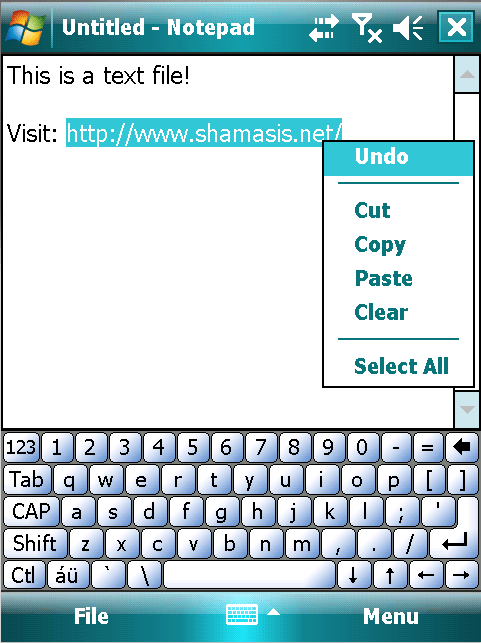
- Standalone Executable: No installation required, simply run the executable file.
- Lightweight: Minimal memory usage ensures fast loading and smooth performance.
- Safe Editing: Does not lock files during editing, allowing safe and concurrent access.
- Compatibility: Works with .NET Compact Framework 2.0 and is compatible from Windows Mobile 5 to 6.5.
- Resource Efficient: Zero idle-time CPU usage and adapts to device orientation and resolution to optimise performance.
Version History
Updated v1.6 (27th August, 2009)
- Windows Mobile 6.5 Compatible
- Support for fullscreen display
- Word and character count
- Fixed Bug: Word-Wrap Context-Menu Issue
- About Dialog shows application version.
— Thanks Gerry, Foliator, stylez, 6Fg8, vn1minh, mccune
Updated v1.5: (03/09/2009)
- Added ZoomOut Functionality (supported by dexter and blowFish64)
- Minor Bug Fixes
- Marginally reduced application size
Updated v1.4: (18/11/2008)
- Added Find and Replace options (with fast ‘Replace All’ algorithm)
- Minor Bug Fixes
Updated v1.3: (06/11/2008)
- Added an “Edit” menu for easy access from Hardware buttons
- Added “Insert Date” feature from the new “Edit” menu
- Added “Open With” and “Send To” compatibility for opening files from any File Explorer (Thanks to joemanb for BETA testing)
- Remembers last used settings (Font, Zoom)
Updated v1.2: (04/11/2008)
- Added font changing feature (normal or fixed-width.)
- Added screen orientation change handling support. (Thanks to OceanSpray)
Updated v1.1: (28/10/2008)
- Added Zoom Functionality
- Reduced Executable Size!
Do More With Notepad Mobile
Create Start Menu Shortcut: Use the freeware software Shortcut Maker to create a shortcut for Notepad Mobile in your Windows Mobile Start Menu.
Enhance File Dialogs: Overcome the limitations of Windows Mobile’s native open/save dialog boxes by installing File Dialog Changer.
File Association: Associate text (.txt) files or other similar files with Notepad Mobile using myExtensions.
You may check out this xda-forum post for more information and user testimonials. Rated 4 out of 5 under MobileTopSoft and FrewarePocketPC FrewarePocketPC downloads.
69 responses to “Notepad Mobile”
-
Thanks for this app! Would be nice if one could associate file extensions to it.
Notepad Mobile Version: 1.5LikeLike
-
I will make a final installer for it as soon as I solve the UTF-8 issue. Then you may use the installer to associate it with .txt files.
However, there is a nice Open With Explorer Plugin that allows you to open any file with any application. You may try it and lemme know.
LikeLike
-
-
Will this work on wm6.0 or 6.1 STD??
LikeLike
-
This will surely work on any WM platform capable of running Microsoft .NET Compact Framework 2.
LikeLike
-
-
Hello, Just this message to thank you for this light-weight tool, more than handy to browse INI files without locking the file (like PWORD does) If you need a translator to make a French version, i’m willing to help… Let me know ! 😉
LikeLike
-
Thanks a ton for your appreciation. I will very soon convert this application to have an installer along with a portable version. The day i start working on it, I will send you the translation resource file. 🙂
LikeLike
-
-
Need italian version of this nice and essential application. My vote: 10/10
LikeLike
-
Thanks Paolo. Translation job will begin very soon. Before that, this application needs to be packaged (cabbed) and a few more features added. I will personally get in touch with you once things are on its way. 🙂
LikeLike
-
-
I like Notepad Mobile very much, and and am now using it as my default text editor. Thanks a million!
— pertinent to version 1.5 —
Nevertheless, I have run across one bug in version 1.5: Whenever I switch off the word wrap, I lose the tap & hold context menu. If I switch word wrap back on, it doesn’t help, so I need to restart the program.
Regarding the UTF-8 issue, I’m getting full UTF-8 support with the program, so I’m not sure exactly what the issue is about.
LikeLike
-
Thanks a lot for using Notepad Mobile. I hope that very soon it will become more useful for you.
— pertinent to version 1.5 —
Indeed the bug you have reported is true. I am looking into it and would fix it in my next release.
Regarding UTF-8, I am reported that they open fine. But, when you save them, it gets saved as ASCII. 😦LikeLike
-
I’ve been experimenting with it, and whenever I save an existing UTF-8 file as a new file, it’s still in UTF-8, at least it looks correct when loaded into other UTF-8 editors. Just to be sure, I use some extended characters, but everything still looks fine.
I’ve noticed that the other .NET CF editors I’ve tried all use UTF-8. Is this chosen by the developer, or a default in .NET CF? The default on my device is ANSI, which also supports extended characters.
LikeLike
-
-
-
A BETA version has been uploaded on the xda-developer forum. Download, test and do give me feedback.
New feature: Fullscreen option. Bug Fix: WordWrap issue (reported by Gerry.) Performance Fix: Resize routine optimized.
After the v1.6 launch, I will cleanup the comments that are not pertinent to the new release. This would avoid confusion among other/new downloaders.
LikeLike
-
I’ve given 1.6 beta a thorough test. Thanks for fixing that word wrap bug. No further problems have shown up, and it’s nice to have the extra editing space provided by that full-screen option.
Gerry
LikeLike
-
Updated Notepad Mobile to Version 1.6. See changelog at: http://www.shamasis.net/projects/notepad-mobile/version-history/
Thanks to Gerry, Foliator and rest of xda-developers for testing out the BETA.
LikeLike
-
Thanks.
I Rank this 9/10.
Can you add spelling checking featute in this.
Reply.
Regards: Naresh ( India)LikeLike
-
Naresh, adding a spell-checker will significantly reduce the performance of this application and consequently will ruin the whole purpose / USP of this software: “Fast, Stable Text Editor”
LikeLike
-
-
Thanks for the new version 1.6.0!
bugs find in version 1.6.0:
– if i open existing txt file, the italian accent characters as à, è, ù and other are not show (them are truncated)
– if i write with Notepad 1.6 new txt file using italian accent characters as à, è, ù and other they are right show. If i open with notepad this new file write with Notepad all caracters are right show. But… if i open this new file with Word Mobile the italian accent characters as à, è, ù and other are not correct show (one accent characters are replaced with 2 other “casual” caracters…LikeLike
-
Yes! You are right. I have observed this as this issue was reported earlier by Foliator at xda-developers.
http://forum.xda-developers.com/showpost.php?p=4349783&postcount=94 and http://forum.xda-developers.com/showpost.php?p=4293981&postcount=75
The issue seems to be in the difference the way UTF-8 signature is handled by different editors. Let me see how I can work it out.
LikeLike
-
That’s true, Shamasis. Just for clarification, when saving in UTF-8, some editors place a three-byte signature at the top of the document. It can be seen in the file if opened by the built-in editor in Total Commander, which doesn’t support UTF-8, and it looks like this: 
cke inserts it, for example, but others, including Notepad Mobile, do not. I’ve noticed that Word will display a UTF-8 encoded file correctly if that signature is present, otherwise the extended characters won’t be recognized.
By the way, cke correctly identifies the files created by your editor as UTF-8 whenever they contain accents, etc., but as ANSI if there are no special characters.
Anyway, the official 1.6 release is running very smoothly here. Great work!
Gerry
aka Foliator 😉LikeLike
-
Hey Gerry… you are Foliator!!! 😀 I am very pleased to meet you. Thanks a tonne for your feedback. The 3-byte  BOM should ideally be put in by .NET stream writer, but it is not. I am looking into a workaround.
LikeLike
-
-
That’s understandable, Shamasis, because two other .NET text editors I’ve tried also omit that string.
Working around the limitations of .NET CF appears to be quite a challenge! But then I wouldn’t know, because I haven’t written a single program since the days of MS-DOS and BASIC (ancient history). 😉
LikeLike
-
My two cents: it seems with both 1.5 and 1.6 there are some problems showing the end of “big” files (mine bigger is about 75KBytes, not so big!).
Tested with a new HTC Touch Pro2, WM6.1.
Thank you for your precious work!
LikeLike
-
This is a known issue of Microsoft DOTNET Compact Framework of Windows Mobile. Doing a workaround might considerably impact performance of this application. Hence, I have kept the resolution to this as a lower priority job. 🙂 Fixing the root is not always easy. 😉
LikeLike
-
uops. Sorry for duplicated request.
Which is actually the file size limit? I’ll try to split the file into more files.
Thank you very much!LikeLike
-
-
-
I can’t run the Notepad.exe program. It says Notepad.exe has stopped working.
I use Windows Vista and my husband use s XP and he coulodn’t open it either. Please advise.LikeLike
-
Notepad.exe is not meant to be run on your PC. You need to directly run it from within our Windows Mobile device. Simply extract the downloaded file into any directory (preferably /Program Files) on your Windows Mobile device and run it from there.
LikeLike
-
-
Hello,
I’ve tested the V1.16 version, it looks like encoding for éàè characters is bad… like V1.15
Also, i’ve tried to open ‘big’ files with the Notepad (Soft LOGS, only 100KB), but the display is a little buggy at the end of the file : Blank screen, or the repeat of the last line displayed, like in memory leaks…
Hope this will be corrected soon… Looking forward for the TXT file to translate this good app in French ! (Maybe with Pocket Notepad ??? 😉 )LikeLike
-
-
— pertinent to version 1.6 —
I’m probably being very stupid with something, but I have installed this on my MDA Mail smartphone (Windows Mobile). However, every time I try to run it I just get a “An unexpected error has occured” message straight away. The details say it is a “Not Supported Exception”.
The version is Mobile 6 Standard, CE OS 5.2.1620LikeLike
-
— pertinent to version 1.6 —
As of now, non-touchscreen phones and Windows Mobile Standard is not supported.LikeLike
-
-
— applicable to Notepad Mobile v1.6 —
Great apps sir, thanks a lot for it! May I suggest “Auto open last” option and “Recent file list”? That would be nice!LikeLike
-
You are most welcome. Glad to be of your help. The two features you mentioned are on the top of my wishlist. 🙂 Will update you as soon as I release them.
LikeLike
-
-
This program is exactly what I was looking for. Thanks so much. The only problem is that it is not showing in Programs on my device. I actually have to go into File Explorer and open Program Files just to launch it. Am I missing something?
LikeLike
-
— pertinent to version 1.6 —
You are not doing anything wrong. Notepad Mobile is a portable application and does not have an installer as of yet. You have two options: (1) Notepad Mobile 1.7 will have an installer that will create a shortcut in “Programs” section or (2) You can manually create a shortcut by going copying Notepad.exe file and then doing a “Paste Shortcut” inside /Windows/Start Menu/Programs/ folder.There is also a freeware software that can help you add Start Menu shortcuts: http://www.freewarepocketpc.net/ppc-download-shortcut-maker.html
LikeLike
-
-
Very nice application, thank you very much. Is there any option that when I open Notepad, to open directly the last viewed/ saved document? Maybe a notation in the registry?
LikeLike
-
Its on my list of features to be added. But I am unable to devote much time to it. But I guess, I will do it ASAP.
LikeLike
-
-
Hi! Just tried to run Notepad Mobile in my Samsung SGH-i321N with Windows Mobile 5.0 but get an error msg: NotSupportedException at Microsoft.AGL.Common.MISC.HandleAr() at etc. etc.
Any idea how to solve it? Thanks in advance!LikeLike
-
I ran into the same problem with my Samsung i637 Jack running Windows Mobile 6.5
LikeLike
-
-
Shamasis, this isn’t a feature request, but merely a question:On what does Notepad Mobile base its default font faces of Tahoma for proportional and Courier New for monospaced? Is it basing these on the WinMo system fonts, or are they hard-coded in your app?What brought this up is that I recently changed my device’s system font face in the registry (\\Registry\HKLM\System\GDI\SYSFNT\Nm) from Tahoma to Arial Bold, due to my poor vision, and soft reset the device. This has improved the visibility in many apps wherever they use the system font, so I figured that it might also work in your program. I exited Notepad Mobile and deleted its registry key, but when it was restored after a restart, Tahoma and Courier New were still there. Changing them manually doesn’t work, either.Aside from a new font choice option in the editor, which might compromise its stability and speed (not to mention your spare time), is there any way to change this — perhaps a registry key I’m not aware of?
LikeLike
-
Uhm… as usual yiu guessed right. 🙂 The fonts are hard-coded. This is because, WinMo has no “definition” of fixed-width fonts. What I may do, as I have already chalked out the feature list, is provide a Font Choice in the new settings sub-app that we were discussing long back.
However, next time onwards, please don’t be so formal. You are always welcome to put forward your suggestions as I feel that you have contributed a lot towards the evolution of this app and I give all credits for that. 🙂
LikeLike
-
-
this is a wonderful text editor so long as you don’t try editing files that don’t have extension, only dots eg “file..”
LikeLike
-
What happens then? 😛 😉
LikeLike
-
-
@mohnkee, I’ve found that Notepad Mobile can edit any text file, even one with an unsupported file extension or no extension at all, as long as you select “All Files” in the Open and Save dialogues. Otherwise the program, like most plain-text editors, will append the conventional “.txt” to your file name. I just tried it, and it worked just fine with a file name ending in three dots and no extension, as well as one with neither dots nor extension. Naturally you wouldn’t be able to associate such files with Notepad Mobile, or any other editor, for that matter.
LikeLike
-
Thanks, Shamasis. Sounds like a good plan.
LikeLike
-
@mohnkee, try selecting “All files” in the Save and Open dialogues; this will prevent the editor from using the default extension. Notepad Mobile can definitely open plain-text files with just dots or even no extensions at all; I’ve used it that way on a number of occasions.
LikeLike
-
Thanks, Shamasis. By system font, I was referring to the proportional font that usually appears by default in programs that don’t offer a choice of font faces. It also appears in such places as the address bar in PIE, etc. Now that I tweaked the registry, the default of Tahoma 9 Regular no longer appears there; now it’s Arial 9 Bold, but some other programs besides Notepad Mobile don’t seem to recognize the change, either. As for the fixed-width font of Courier New, it’s very faint on my device. I now use DejaVu Sans Mono Bold, which I downloaded from the web, but I can’t force apps such as PIE to use it in forms and such, since I can’t find an entry in the registry that controls it. Anyway, your plan sounds like a good one!
LikeLike
-
Wow! Sorry about the two repeated posts. The submissions didn’t seem to go through the first time. I lost them altogether, and had to recreate them from scratch.
LikeLike
-
Thanks shamasis… It’s worked 🙂
LikeLike
-
[…] Mobile was developed by Shamasis Bhattacharya. You may check out the developer web site at http://www.shamasis.net/ or you can direct download Notepad Mobile [ZIP] (version 1.6, 24.2 […]
LikeLike
-
Hi Shamasis, works great but how do you open a file that isn’t in the list of folders, for instance a file in a system folder such as “Program Files” or “Windows” ? These don’t appear as options in the drop down list. Thanks.
LikeLike
-
I am aware of the issue. This issue is with all Windows Mobile applications that uses Windows Mobile’s own file open/save dialog box. Due to performance issues, I am currently restricted to using Windows Mobile’s native open/save dialog boxes.
Users of Notepad Mobile has come up with alternatives like File Dialog Changer (thanks to Gerry), that does the trick.
LikeLike
-
-
That link for File Dialog Changer eventually leads to a Yahoo error page in Japanese. Here’s a direct link; I just checked it and it’s still valid:
http://www.geocities.co.jp/SiliconValley-Cupertino/2039/filedlgchg.zip
Don’t forget to use it in conjunction with gsgetfile.dll, which is here:
http://www.prco.jp/~shinichi/dl/dl.php?dl=30
You’ll wind up with two small files, filedlgchg.cpl and gsgetfile.dll, both of which belong in the \Windows folder.
Works like a charm, not only with Notepad Mobile, but with most other apps that use file dialogues.
LikeLike
-
[…] Mobile was developed by Shamasis Bhattacharya. You may check out the developer web site at http://www.shamasis.net/ or you can direct download Notepad Mobile [ZIP] (version 1.6, 24.2 […]
LikeLike
-
[…] Lösung für schnelle Notizen installiere ich Notepad Mobile, einen kleinen, wieselflinken Texteditor. Der hat leider auch einen kleinen Nachteil: aus irgend einem Grund lässt er sich nicht in die […]
LikeLike
-
hi, i’m using samsung omnia pro b7330. i tried to use this application but it failed to run on my mobile. please advise becoz i really need a text editor.
b7330 used wm6.5tq
LikeLike
-
Did you try installing the dotnet compact framework as discussed above in this page? If you still have errors, send me more details of the error at my email address.
LikeLike
-
-
thanks for the post it helps me to make my research papers
LikeLike
-
You are welcome.
By the way, what is your research topic (if you don’t have issues talking about it)? 🙂LikeLike
-
-
[…] – Source […]
LikeLike
-
Hi I need this program so much. I install it run it, but when I open *.xml file (aprox 206 kb) and try edit it nothing happend. I can only see cursor but it is imposible anything write. What is wrong?
And that problem is also with other format. I run it on Win Mobile 6.0 classic.Thank you very much.
— Applicable to Notepad Mobile 1.6 —
LikeLike
-
As per reports from users, 206 kb is a tad on the higher size of what Notepad Mobile can seamlessly handle on devices with lesser RAM or slower Processor. What is the device that you are testing it on?
LikeLike
-
-
Thanks, easy to work indeed. I have a HTC Touch HD and the feature you created seems to be very useful. I use it to edit HTML files. It works perfectly.
But when I try to write French texts (with specific accents) in Notepad and after I want to see the result of my work by using the browser…
I’m afraid there is no complete compatibility in Character sets. Can you change from UTF to Latin? Latin is also the default for xml… from my knowledge. “” – that’s what I call Latin, that ISO.
Anyway, there is no other solution to edit HTML on the HTC Touch HD than using such an editor.
And for pure English it works.
Thanks a lot.LikeLike
-
Never too late, but I am working on adding Character Set selection. Unless I hit any roadblock, I will include it.
LikeLike
-
-
ISO 8859-15
LikeLike
-
I’m not much of a touch-typist (not hunt-and-peck either!), so sometimes
type some text with Caps Lock acccidentally on. This is mostly on PC,
though if I put my miniature USB keyboard on my PPC I can do it there
too.On PC I have been used to using Microsoft Word to swap text case,
pasting backwards and forwards as needed. But Word is rather heavy for
that purpose. And Word Mobile is no help at all.So I recently realised that I can easily write a PC/PPC program to do
what I want.The five case-altering functions work like in Word, except that I don’t
know exactly how Word defines the “words” that are given an initial
capital letter in “Title Case”. I only look for space-separated words.
Similarly a “Sentence” is assumed to be the whole content of the text,
disregarding any punctuation or line breaks.The alterations may be applied either to the whole text (default) or, by
highlighting, to just the highlighted portion. This can be useful for
ensuring that abbreviations are in upper case, for example, or names are
capitalised.It would be great to have something similar in Mobile Notepad. You are welcome to my code, but it is in Basic4PPC.
Mike.
LikeLike
-
The title case of MS Word involves language rules of title casing for the language the document is typed in. Doing the same in PPC might just be an overkill.
I will definitely try including your feature in Notepad Mobile and then would profile it to check how heavy it makes the software. And if all goes well, will post an update.
LikeLike
-
-
Hello Shamasis,
Does Notepad Mobile have option for “Right-To-Left”, please?
Thanks,
-JoeLikeLike
-
Sadly, Notepad Mobile does not allow selection of RTL fonts as of now. However, I will keep you posted once available.
LikeLike
-
-
Hello? I want to download your notepad mobile… but currently the download link seems to be not working. Thank you.
LikeLike


 Shamasis Bhattacharya
Leave a reply to SorinBalan Cancel reply