
Liquid Drag
Liquid Drag is a lightweight utility that enhances your computer’s usability by making windows translucent while dragging. This feature allows for precise window positioning by revealing the content underneath, making multitasking more efficient and seamless. Designed to work on any hardware, Liquid Drag is compatible with any version of Windows.
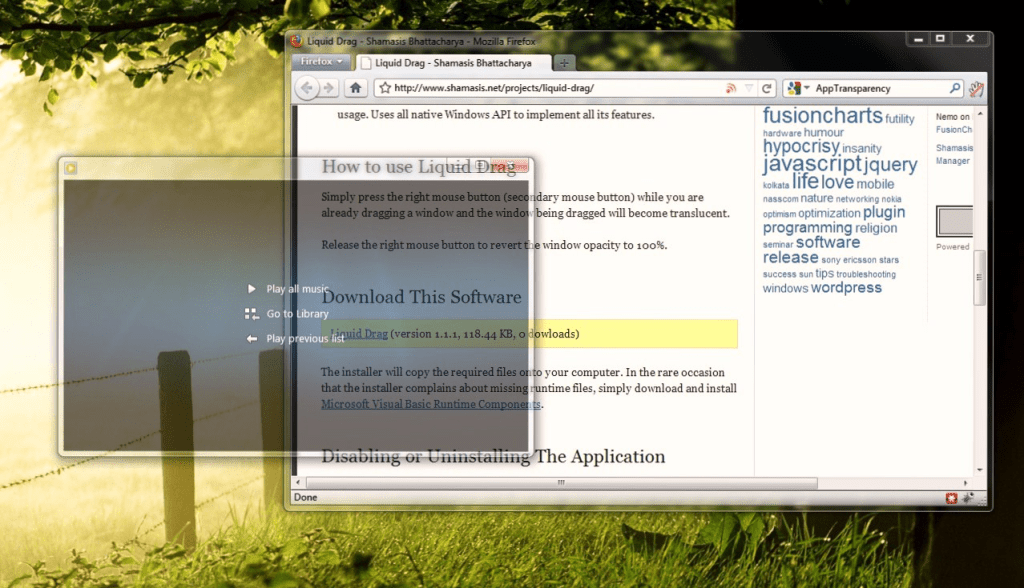
To use Liquid Drag, start by moving a window normally with the left mouse button. While dragging, press the right mouse button to make the window translucent, allowing you to see what’s underneath. Release the right mouse button to revert the window’s opacity to its original state. This simple and intuitive functionality enhances your multitasking experience without requiring any special configuration or graphics hardware.
New two-button drag
Drag a window with both mouse buttons to make it translucent, allowing you to see what’s underneath.
Simple and intuitive
Zero configuration needed. Just install and use.
Ideal for all systems
Perfect for low-powered or older computers due to its efficient design and reliance on native Windows functionalities.
Lightweight: Minimal resource usage ensures it runs smoothly without slowing down your system. Runs unobtrusively in the background with as low as 700K of memory consumption. No background polling or idle-time CPU usage, leveraging all native Windows APIs for optimal performance.
Compatibility: Works seamlessly with Windows 2000 and above, without requiring any special graphics hardware.
Frequently asked Questions
How do I disable Liquid Drag?
To disable the application, open Task Manager and end the process named “AppTransparency.exe.” The program will reload upon Windows restart. To permanently disable it, uncheck the “AppTransparency.exe” startup entry using msconfig (Start → Run → type msconfig.exe → OK → Startup Tab).
How do I uninstall Liquid Drag?
Simply delete the application folder. If installed in the default location, delete the folder: \Program Files\Twentyone Innovations\AppTransparency. Also, remove the “AppTransparency” Start-Menu entry from the “Startup” folder.
Why do I need .NET Framework?
If the installer complains about missing runtime files, download and install Microsoft Visual Basic Runtime Components.
I have nVidia Desktop Manager, do I need this?
This is a feature that is similar to what is provided by the nVidia Desktop Management software. However, Liquid Drag adds the two-button dragging functionality that is more intuitive to use.
17 responses to “Liquid Drag”
-
[…] Download Liquid Drag […]
LikeLike
-
-
Hey… thanks!
LikeLike
-
-
[…] vi è poi da annoverare il consumo di risorse decisamente ridotto all’osso.Download | Liquid Draggenerabanner('singlepost_3');Condividi questo articolo Share var external_use_page_url = […]
LikeLike
-
This is great man. I had been thinking about a feature in Windows similar to this for over a year now. Great to see you have implemented it.
LikeLike
-
Not only nVidia, but also ATI used to provide similar functionality in their drivers (see page 16 of http://support.amd.com/fr/GPU_TechDocs/HydraVision32.pdf), but only for 2K/XP.
When searching for a replacement software for Win7, I found Liquid Drag and… well… that’s not it doesn’t works… but… for a regular use… is this popup really required on every start ?LikeLike
-
The app is not supposed to show the popup if the command-line argument “-startup” is used.
When this application installs, the startup start-menu entry it makes already has this command-line argument, thus not showing the popup upon next startup.
LikeLike
-
-
[…] scaricare Liquid Drag collegandovi a questa pagina web e facendo clic sul relativo pulsante di […]
LikeLike
-
[…] http://www.shamasis.net/projects/liquid-drag/ Temas: baixar, janelas, Liquid Drag, Melhoria de Desktop, transparências […]
LikeLike
-
[…] ¿Les gusta? Si es así, aquí está el link para que la descarga de Liquid Drag. […]
LikeLike
-
[…] Liquid Drag [vía] Publica un comentario » Publicado en: Software, Windows Etiquetas: freeware […]
LikeLike
-
[…] Liquid Drag [vía] AKPC_IDS += "13718,";Popularity: unranked […]
LikeLike
-
[…] Homepage: Shamasis Bhattacharya […]
LikeLike
-
[…] Homepage: Shamasis Bhattacharya […]
LikeLike
-
[…] is in the background, but it quickly becomes annoying when it happens every time you move a window.Liquid Drag is a very lightweight app that tries to provide the best of both worlds. With Liquid Drag running […]
LikeLike
-
[…] is in the background, but it quickly becomes annoying when it happens every time you move a window.Liquid Drag is a very lightweight app that tries to provide the best of both worlds. With Liquid Drag running […]
LikeLike
-
[…] Download Liquid Drag » Tags: Adjust Windows , Transparency « Warnygo: Create & View Alerts For Emergency Situations Nearby [WP7] Tip: Easily open links in new tabs by pressing the scroll wheel on your mouse » […]
LikeLike


 Shamasis Bhattacharya
Leave a reply to Come attivare la trasparenza delle finestre in Windows | Maestroabc Cancel reply